Your username
Use your username or the email address registered to your account.

Sign in with your username or email address and password. Created your account with Google or Steam? Use the same service the next time you log in.
18+. Gamble responsibly.
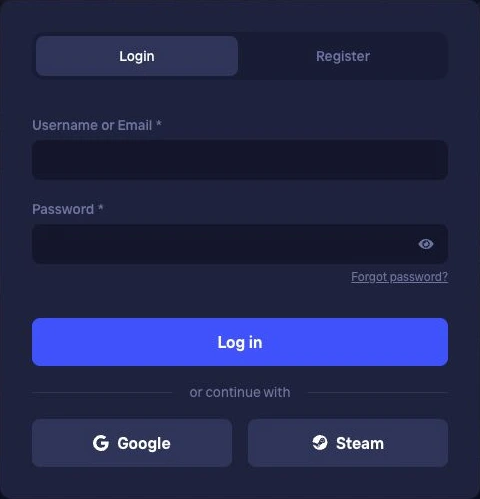
On the login screen, enter your username or the email address linked to your account in the “Username or Email” field. Then enter your password and select “Log in”.
Use your username or the email address registered to your account.
Enter the password you set for this account.
Select “Log in” to access your account. You don't need to register again if you already have one.
An extra space can cause a pasted password to fail. Passwords are case-sensitive. You can use the eye icon to reveal your password before submitting it.
We support sign-in through Google and Steam. If you created your Duel account through one of these services, select it on the login screen and use the corresponding Google or Steam account.
If you can’t remember how you registered for Duel, contact our support team at [email protected].
Select “Forgot password?” to open password recovery. Enter the email address linked to your Duel account and select “Send Link”. We’ll send you a link to set a new password.
Can’t find the email? Check your spam folder. If you mistyped the address, enter your registered email again and request another link. Never share your recovery link or new password.
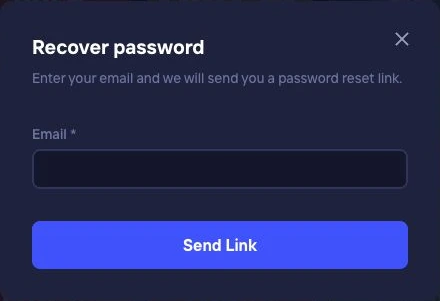
Without access to your registered address, you won’t be able to receive the link. If you haven’t added an email address or can no longer open your inbox, contact our support team at [email protected]. Include your username and describe the issue. Do not send your password or recovery link.
If you sign in through Google or Steam, recover access through the relevant service.
Select “Register” to create an account with a username and password. An email address and referral code are optional. Adding an email address enables password recovery by email later.
A referral code links your account to the person who invited you. It isn’t a password and you don’t enter it each time you log in. To register, you must be at least 18, accept the Terms and Conditions and play from an eligible country.
Use the same login details in your smartphone browser as on your computer. If you registered with Google or Steam, use that same service on mobile too.
Sign out after playing on a shared device. Never share your password or recovery link.
Yes, if it's linked to your Duel account. Enter your username or registered email address in the “Username or Email” field.
Select “Forgot password?”, enter your account email address and select “Send Link”. Use the link in the email to set a new password.
You won't be able to receive a password recovery link for that account by email. Contact [email protected] for help. Include your username, but don't send your password.
On the login screen, select the service you used to create your Duel account and sign in with the corresponding Google or Steam account.
No. A referral code is optional at registration. To log in, use your credentials or the Google or Steam account you registered with.
Yes. Sign in through your mobile browser using the same credentials or Google or Steam account.
Registering again won't lift the restriction on your existing account. For help with an account restriction, contact our support team at [email protected].
Already have a Duel account? Sign in with your login details or through Google or Steam.

